

I Turned a Seven-Year-Old Phone Into a Personal AI Agent
The Samsung S10E was headed for a landfill. Now it's an AI agent that rewrites its own code.

There’s a Samsung Galaxy S10E that’s been sitting in my drawer for about seven years now. Six gigabytes of RAM, an octa-core processor, WiFi, Bluetooth, GPS, four cameras, forty-three sensors, and a battery that doubles as a built-in UPS. More raw capability than a Raspberry Pi, collecting dust because Samsung stopped pushing updates.
On Friday evening, I pulled it out. I didn’t have a grand plan. I just wanted to see how far I could get building an AI agent from scratch, starting from nothing, on hardware most people would throw away. The honest motivation was curiosity and the itch to build something with my hands. Well, my hands and Claude Code.
By Sunday night, I had a personal assistant that understands voice messages, controls the phone’s hardware, remembers conversations across sessions, and can modify its own code when I ask it to. I called it Chorgi. I want to walk through how I got there, because the process itself was the most interesting part.
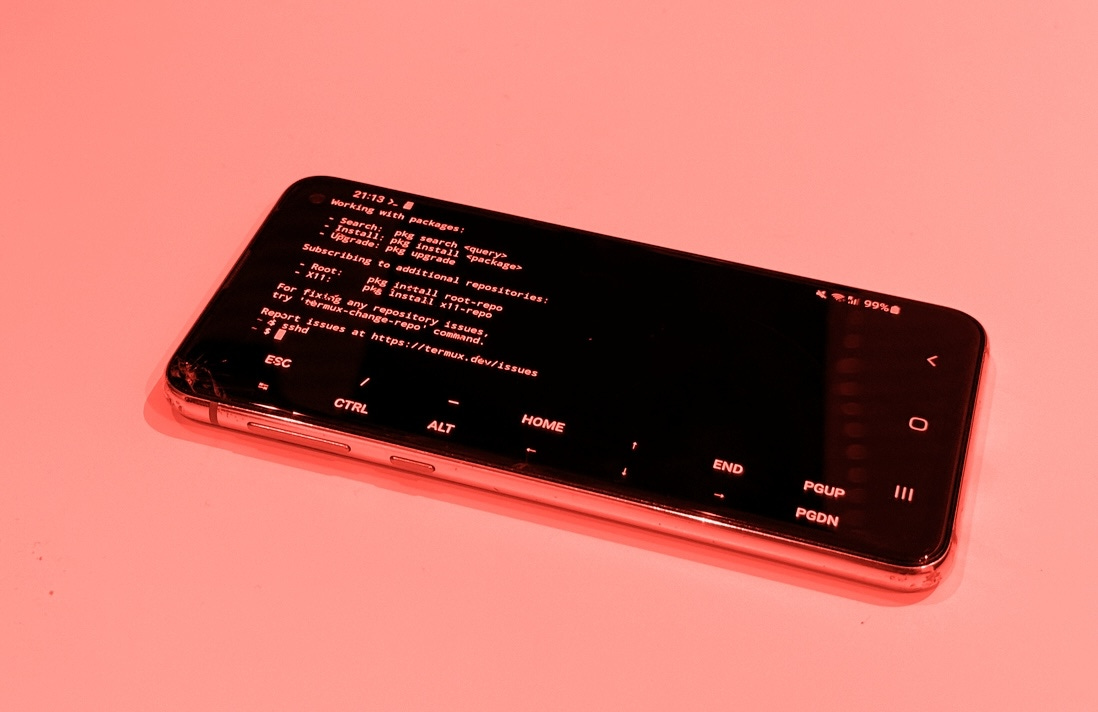
From drawer to Linux machine
The first step had nothing to do with AI. Before any of the interesting stuff could happen, I needed to turn a consumer Android phone into something I could actually program on.
Factory reset for a clean slate. Developer options enabled by tapping the build number seven times in the settings (a ritual that never stops feeling like a cheat code). “Stay awake while charging” turned on. Battery optimisation disabled for Termux.
Termux is what makes the whole thing possible. It’s a terminal emulator that gives you a proper Linux environment on Android, no root required. One important detail: you have to install it from F-Droid, not the Play Store. The Play Store version hasn’t been updated in years and is essentially broken. I also grabbed Termux:API (which exposes phone hardware to the command line), Termux:Boot (for auto-starting services), and Termux:Widget.
With Termux running, I installed the basics: Python, Node.js, Git, SSH, tmux, and a handful of networking tools. Then I set up SSH so I could connect from my laptop. This was the single biggest quality-of-life improvement of the entire project. Instead of typing on a tiny phone screen, I could work from my laptop’s full terminal, treating the phone as a headless server sitting on my desk.
I also set up auto-start so that SSH launches automatically whenever the phone reboots. A tiny boot script that acquires a wake lock (preventing Android from sleeping Termux) and starts the SSH daemon. After this, the phone became a proper always-on server. Plug it in, and it’s ready.
SSH access is locked down with key-based authentication only, no passwords. Only my laptop can connect, and only from the local network. The phone is accessible, but only to me.
At this point, I had a Linux machine with access to four cameras, forty-three sensors, GPS, a microphone, a flashlight, a vibration motor, and screen brightness control, all accessible from the command line. The hardware was never the problem. The software just needed unlocking.
A bot that listens
I needed an interface. Something I could talk to from anywhere, not just when I’m on the same WiFi network as the phone. SMS was an option, but Telegram was the obvious choice: free, simple bot API, works from any device, and creating a bot through BotFather takes about two minutes. The bot only accepts messages from my Telegram account, so nobody else can interact with it.
The first version was a bash script running in a tmux session. It polled the Telegram API for new messages, pattern-matched against slash commands, executed the corresponding Termux:API call, and sent the result back. Simple as it gets.
/torch on turned on the flashlight. /battery returned the charge level and temperature. /photo triggered the camera, captured an image, and sent it back through Telegram. /location grabbed GPS coordinates. /wifi showed network information. /room read the barometric pressure from the phone’s LPS22H sensor and estimated room temperature from the battery thermistor (roughly 2°C offset from ambient, not precise, but surprisingly useful).
It worked. And it was completely useless for anything beyond the specific commands I’d hard-coded. If I asked it “what’s the weather like?” it would just sit there. No understanding, no flexibility, no intelligence. A remote control with a chat interface.
Adding a brain
The next step was obvious: route messages through Claude. Instead of only responding to pre-defined slash commands, every message would go through an LLM that could reason about what I was asking and decide which phone commands to execute.
I used the Claude Code CLI for this, and the reason was practical: Claude Code supports OAuth authentication, which means I could run everything under my existing Pro subscription. No API key needed, no separate billing, no credits to manage. For a weekend project, this was ideal.
Getting Claude Code running on the phone required a small workaround. Claude Code expects a /tmp directory, which on Android lives on a read-only partition (no root, remember). The fix was proot, a lightweight tool that lets you fake filesystem paths. A simple alias in my shell config made it transparent: alias claude='proot -b $PREFIX/tmp:/tmp claude'. One detail that cost me twenty minutes of debugging: this alias has to use single quotes. Double quotes cause the shell to expand $PREFIX at definition time instead of execution time, which breaks the path.
With Claude wired in, the bot suddenly understood natural language. I could say “turn on the flashlight” or “take a photo of the room” or “what sensors does this phone have?” and it would figure out the right commands to run. The jump from slash commands to natural conversation felt enormous.
But two problems appeared immediately.
First, every response took about fifteen seconds. The architecture was heavy: each message spawned a subprocess chain of proot, Node.js (the Claude CLI), and a Python MCP server communicating over stdio. That’s a lot of startup overhead before any actual API call happens.
Second, and more importantly, the bot had no memory. Every message was a completely fresh start. I could have a detailed conversation about setting up a reminder, and two messages later it had no idea who I was or what we’d been discussing. Each invocation of claude -p (pipe mode) is stateless by design.
The speed problem was annoying. The memory problem made the bot fundamentally limited.
Building memory because I needed it
I didn’t sit down and think “now I’ll implement a memory system.” I was chatting with the bot, it forgot something I’d told it thirty seconds earlier, and I realised I needed to fix this if the thing was going to be useful at all. The bot needed to understand its environment, remember context across conversations, and be able to complete tasks from beginning to end.
The approach I landed on was deliberately simple. Just markdown files on disk, assembled into a system prompt before every message.
The memory system has a few layers. A core identity file that’s always loaded, defining who the bot is and how it should behave. A user facts file where the bot stores things I tell it to remember (via a /remember command that just appends to the file). A self-knowledge file that gets loaded when someone asks the bot about its own architecture. And a collection of topic files, each with keyword triggers in their headers, that get loaded on demand when the conversation touches their domain.
The topic files are where it gets interesting. The phone has over eighty Termux:API commands across cameras, sensors, audio, communications, location, hardware control, UI interactions, storage, and networking. Loading all of that into every prompt would blow through the token budget immediately. Instead, I created nine topic files covering different capability domains. When I mention cameras, only the camera knowledge loads. When I ask about sensors, only the sensor file loads. Simple substring matching against the incoming message.
There’s a budget system capping the assembled prompt at six thousand characters. Core identity and user facts are mandatory and always included. Optional sections get added in order until the budget runs out, then they’re dropped. It means the bot always has its essential context and loads specialised knowledge just in time.
The whole memory manager is about a hundred and fifty lines of stdlib Python. Just files. Markdown on disk, editable by hand or programmatically by the bot. The data format is the interface.
Teaching it skills and tools
With memory sorted, the bot understood context and could maintain conversations, but it still couldn’t do much beyond controlling the phone’s hardware. I added tool capabilities: web search, note-taking, file management. Each implemented as a Python module that Claude can call during a conversation.
This is also where I tackled the speed problem. The original architecture, shelling out to the Claude CLI for every message, was adding minutes of overhead. I replaced it with a direct HTTP bridge to the Anthropic API using urllib (stdlib Python, still keeping dependencies minimal). The bridge makes a POST request, and if Claude wants to call a tool, it executes the tool in-process and feeds the result back, looping up to ten rounds until the response is complete. This part does require an API key and credits, unlike the CLI approach, but the speed difference made it worth it for the conversational tier.
The bridge also manages conversation history, keeping the last twenty messages per chat, persisted to a JSON file. So the bot now has both long-term memory (the markdown topic files) and short-term memory (the conversation buffer).
The result: response times dropped from three to five minutes down to about fifteen seconds. Pure API latency, no overhead. And the change required modifying exactly two lines in the router to swap the old bridge for the new one. Everything else, the bot, the memory system, all the tools, stayed the same.
The three-tier architecture
What emerged over the weekend wasn’t planned. Each tier appeared because the previous approach hit a limitation.
Tier one handles known slash commands. When I type /battery or /torch on, there’s no reason to involve an LLM. The command is pattern-matched in Python, the corresponding Termux:API call is executed, and the result comes back instantly. Sub-second response times for things that don’t need intelligence.
Tier two handles everything else. Any message that isn’t a known command goes to the Anthropic API with the full memory-assembled system prompt and access to all tools. This is the conversational layer, where the bot reasons about what I need, decides which tools to call, and maintains context across the conversation. About fifteen seconds per response.
Tier three is explicit and deliberate. Triggered by /code or /implement, it spawns a full Claude Code CLI instance with write access to the entire project. This is the self-modification layer, the one where the bot can change its own code. It’s separated from tier two on purpose, because you want a clear boundary between “the bot is talking to me” and “the bot is rewriting itself.” Since this tier uses the CLI with OAuth, it runs on the Pro subscription, no API credits spent.
The escalation path is always clear: fast local handling, then conversational AI, then full code agent. And the user is always in control of when the bot is allowed to modify itself.
Plan mode is gold
One thing I want to call out specifically about Claude Code: Plan mode. Before jumping into implementation, you can ask Claude to plan what it’s going to do, review the approach, and only then give it the go-ahead to write code.
When I’m working on Chorgi from my laptop over SSH, this is how I build every major feature. I describe what I want, Claude thinks through what needs to be modified, what new files need to be created, how existing systems will be affected. I review the plan and either approve it or redirect before a single line of code is written. It’s the reason I could move so fast over the weekend. The thinking and the architecture decisions were mine, but the planning and execution were collaborative.
The moment it modified itself
This was the highlight of the weekend.
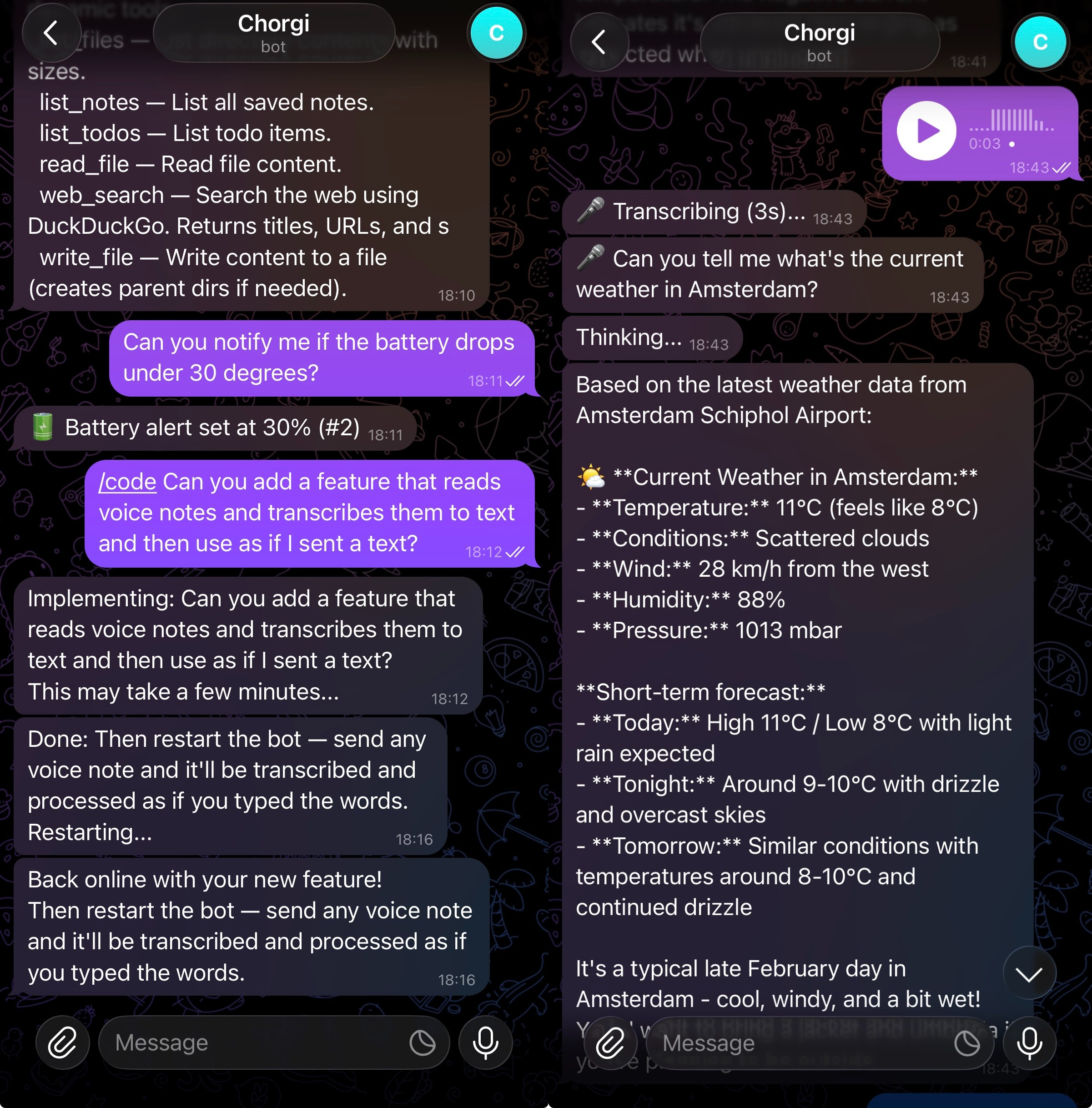
I wanted the bot to handle voice messages. I use Telegram on my main phone to chat with Chorgi, and Telegram supports voice notes natively, so the idea was to send a voice message from my phone and have the bot on the Samsung transcribe and respond to it.
Instead of writing the feature myself, I opened Telegram and sent: “Add voice message support with transcription.”
Then I waited. Three minutes of silence while the bot worked. Then a message appeared: “Restarting with your new feature.”
The bot killed its own process. The watchdog script detected the shutdown, waited five seconds, and restarted it. A message came through: “Back online.”
I sent a voice note. The bot asked me to provide an OpenAI API token for the Whisper transcription service. So I went and created an OpenAI paid plan, generated a token, SSH’d into the phone, and added it to the environment config. I probably could have just pasted it into the Telegram chat, but sending API keys through a messaging app felt wrong somehow. Once the token was set, I sent another voice note. It transcribed it and responded as if I’d typed the message. The feature worked.
I want to be specific about what happened here because it still feels slightly unreal. I described a feature I wanted, in plain English, through a Telegram message, to a bot running on a phone on my desk. The bot planned the implementation, wrote the code across multiple files, wired everything together, restarted itself, and confirmed it was ready. I didn’t open an editor. I didn’t write a line of code. The only manual step was adding the API token, and even that felt like it could have been handled through the chat.
For transcription, the bot uses OpenAI’s Whisper API. Quick, accurate, and straightforward to integrate.
Safety, because self-modification is terrifying
A bot that can rewrite its own code is exciting right up until it breaks itself. Which it will. Which it did.
The safety mechanisms work in layers. First, the bot only accepts messages from my Telegram account. Nobody else can interact with it, let alone trigger code modifications. SSH access is key-based only, limited to my laptop on the local network.
Every code modification starts with a git checkpoint, creating a rollback point before any changes. If something goes wrong, a /rollback command reverts the entire codebase to the checkpoint and restarts the bot.
The watchdog is the last line of defence. It’s a bash script that monitors the bot process and restarts it if it dies. But it also counts crashes: if the bot crashes three times within sixty seconds, that’s a crash loop, which almost certainly means the last code change broke something fundamental. When that happens, the watchdog automatically runs git checkout . to revert all changes, then restarts. The bot heals itself without any human intervention.
There’s also a lock file that prevents concurrent implementations (you don’t want two Claude Code instances editing the codebase simultaneously) and a five-minute timeout that kills any implementation session that runs too long.
The bot has broken itself exactly once so far. The watchdog caught the crash loop, rolled back the code, and had it running again within seconds. I was watching from Telegram and didn’t have to do anything.
What I built over a weekend
Let me step back and describe what actually exists now.
Chorgi is a Telegram bot running on a seven-year-old Samsung phone that sits plugged in on my desk. I can message it from anywhere in the world. It understands natural language and voice messages. It controls the phone’s hardware: cameras, flashlight, sensors, GPS, screen brightness. It can search the web, take and retrieve notes, manage files. It remembers things I tell it across sessions and loads specialised knowledge on demand. It has full awareness of its own architecture and can explain how it works when asked. And it can modify and extend its own codebase when I ask for new features, with safety mechanisms to catch and recover from mistakes.
The entire thing runs on stdlib Python with minimal external dependencies. Memory is markdown files on disk. Session history is a JSON file. The codebase is small enough that a single Claude Code instance can understand all of it. Everything is plain text, everything is inspectable, everything is editable by hand if needed.
The phone stays plugged in and online. There’s a battery degradation trade-off with keeping lithium batteries at 100%, but this is a seven-year-old repurposed device that was headed for a landfill. I’ll take it.
The speed of building
What surprised me most about this project was the pace. I started on Friday evening and had a working, self-modifying AI agent by Sunday. Something I actually use daily.
The reason it moved so fast is that I only needed to figure out what to build and why. The what came from running into limitations: the bot forgot things, so I needed memory. The bot was slow, so I needed a better API bridge. The bot couldn’t learn new tricks, so I needed a self-modification system. Each problem pointed clearly to the next thing to build.
The how was handled by Claude Code. I’d describe the architecture I wanted, the constraints I cared about (minimal dependencies, files on disk, specific budget limits), and it would implement the solution. Not perfectly every time, but well enough that I could iterate quickly. The bottleneck was never the coding. It was deciding what the right approach should be.
This is the thing that made the project addictive. Every improvement I made revealed the next thing I wanted to build. And now, the tool for building the tool is the tool itself. I can keep extending Chorgi by chatting with it on Telegram. The feedback loop is incredibly tight.
Where this goes
Right now, Chorgi calls an API for intelligence. Every conversational message requires an internet connection and a round trip to Anthropic’s servers. That works, and it costs money per message.
But local LLMs are getting smaller and faster. Models that can run on phone hardware already exist, and they’re improving rapidly. Imagine Chorgi with a local model instead of API calls. No internet dependency, no per-message cost, no latency from network round trips. Always on, fully private, running entirely on the device in your pocket.
Now imagine this isn’t a Termux hack on an old phone but a native layer in the operating system. Deep access to apps, contacts, calendar, notifications. A personal assistant that actually knows your context, remembers your preferences, controls your devices, and gets better over time because it can literally improve itself.
That’s not Siri. That’s not Google Assistant. Those are voice interfaces bolted onto search engines. What I’m describing is an agent that lives on your phone and works for you, with the same kind of autonomy and capability that Chorgi already has in its rough, duct-taped form.
I built a prototype of this in a weekend, on hardware from 2019, using tools that didn’t exist a year ago. The gap between what’s possible now and what ships as a default phone feature is mostly just packaging and polish.
I started on Friday because I was curious. I’m still building because I genuinely can’t stop. Every time I sit down to work on something else, I think of another feature to add, and the fastest way to add it is to just ask the bot. I’m already planning what to build next week.